Handling Webhooks
Cadenya will send you webhooks for all types of events that happen during an agent’s objective. Tool calls, messages, and approvals will all be sent to the configured webhook URL on your agent. This makes it possible to steer agents as they need guidance during an objective, like for a tool approval.
For example, if a tool approval is requested, you may want to send a message to Slack, an email to a customer, or a push notification to a device. These notifications are to let your end users know they need to hop in and provide their guidance to an action your AI agent wants to take.
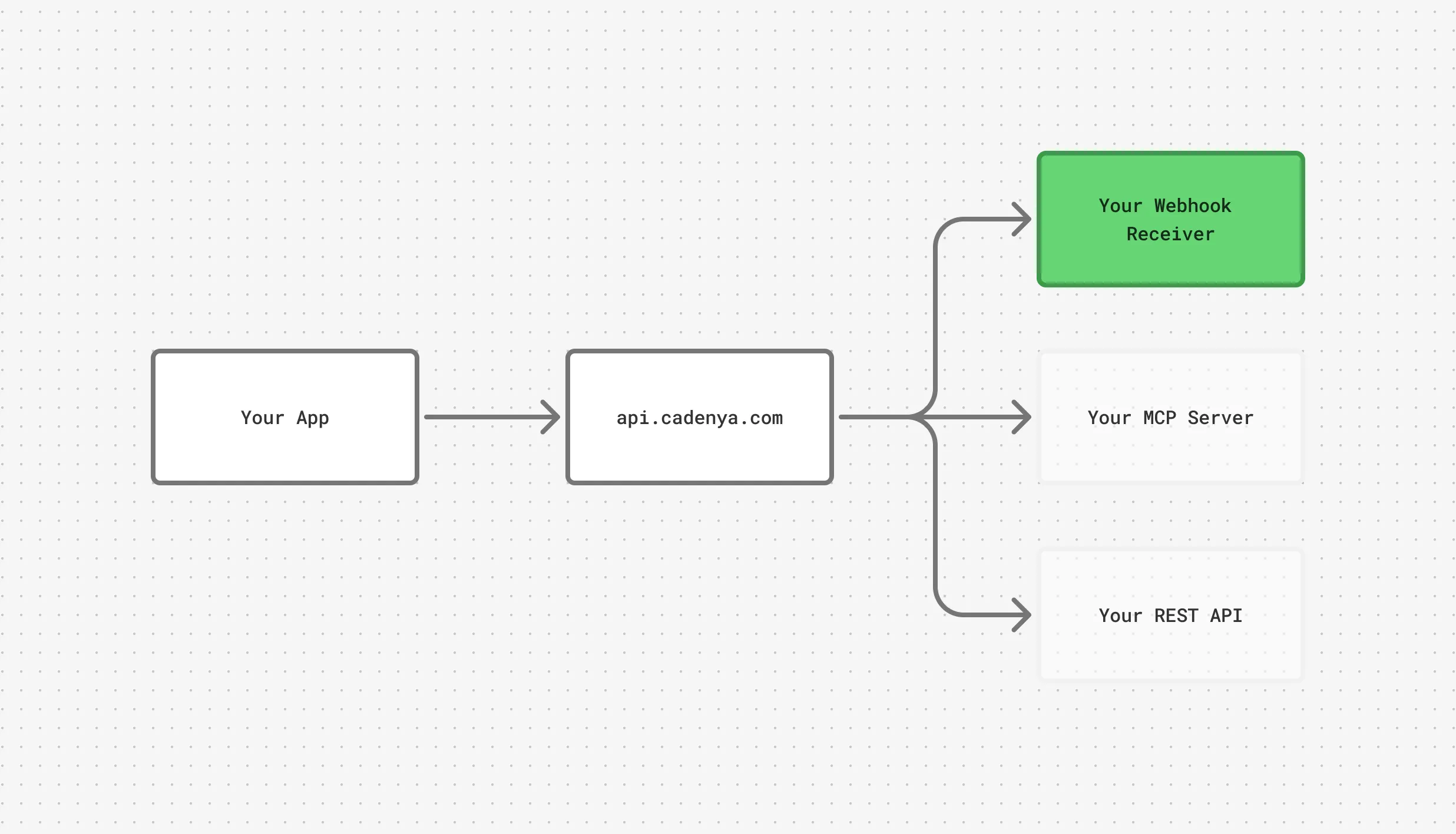
At a high level, this is the architecture of a simple app with Cadenya.
Tools we love
Section titled “Tools we love”We recommend Svix Play as a destination for agent webhooks and the Standard Webhooks verifier as you play around with Cadenya.
Webhooks
Section titled “Webhooks”Webhooks sent by Cadenya conform to Standard Webhooks. They are delivered as POST requests with a JSON envelope containing type, timestamp, and data (with flat agent, agentVariation, objective, and objectiveEvent keys). Signed via Standard Webhooks HMAC-SHA256 (webhook-id, webhook-timestamp, webhook-signature headers).
| Type | Description |
|---|---|
objective_event.user_message | Triggered when a user message event occurs in an objective. |
objective_event.assistant_message | Triggered when an assistant message event occurs in an objective. |
objective_event.tool_called | Triggered when a tool call is executed in an objective. |
objective_event.tool_result | Triggered when a tool result event occurs in an objective. |
objective_event.tool_error | Triggered when a tool call encounters an error during execution. |
objective_event.tool_approval_requested | Triggered when a tool call requires approval (respond via ApproveToolCall/DenyToolCall). |
objective_event.tool_approved | Triggered when a tool call is approved via the ApproveToolCall RPC. |
objective_event.tool_denied | Triggered when a tool call is denied via the DenyToolCall RPC. |
objective_event.sub_objective_created | Triggered when a sub-objective is spawned from a parent objective. |
objective_event.error | Triggered when an error occurs during objective execution. |
objective_event.memory_read | Triggered when the agent loads a memory entry by resolving a key against the objective’s memory stack. |
Handling a webhook
Section titled “Handling a webhook”Cadenya webhooks will contain metadata keys with the information about the event. For example, an objective_event.assistant_message will look like this:
{ "timestamp": "2026-05-04T12:51:57Z", "type": "objective_event.assistant_message", "data": { "agent": { "id": "agent_01KQSGJRXYYR2W2Y34XXGPTQS9", "accountId": "account_01KQSF7M1S6S49WK2GSSYFRSHY", "workspaceId": "workspace_01KQSF7NQX9BMWKEFY06VDTDP4", "name": "Urgent Car Insurance Agent", "createdAt": "2026-05-04T12:49:32.094034Z" }, "agentVariation": { "id": "agentvar_01KQSGJRZ8Y40AFHK0JE0YAD45", "accountId": "account_01KQSF7M1S6S49WK2GSSYFRSHY", "workspaceId": "workspace_01KQSF7NQX9BMWKEFY06VDTDP4", "name": "Default", "createdAt": "2026-05-04T12:49:32.136648Z" }, "objective": { "id": "obj_01KQSGKYGKPXBNJMCRRETCP63X", "accountId": "account_01KQSF7M1S6S49WK2GSSYFRSHY", "workspaceId": "workspace_01KQSF7NQX9BMWKEFY06VDTDP4", "createdAt": "2026-05-04T12:50:10.579393Z", "profileId": "profile_01KQSF7NJ4KD83P8AEH69NXNFM" }, "objectiveEvent": { "metadata": { "id": "objevt_01KQSGQ6CRV0GJ4JTQ6NV8BF19", "accountId": "account_01KQSF7M1S6S49WK2GSSYFRSHY", "workspaceId": "workspace_01KQSF7NQX9BMWKEFY06VDTDP4", "createdAt": "2026-05-04T12:51:56.952342057Z" }, "data": { "type": "OBJECTIVE_EVENT_TYPE_ASSISTANT_MESSAGE", "assistantMessage": { "content": "Looks like you're trying to urgently contact someone about their cars insurance." } }, "contextWindowId": "objwin_01KQSGKYWQJSS9NS7DF7GMY4KM" } }}Handling HMAC
Section titled “Handling HMAC”As mentioned, Cadenya webhooks are Standard Webhooks. They are verified using HMAC. Your webhook secret that is used to sign payloads is found in your Cadenya dashboard. But who doesn’t love pseudo-code to understand something quickly? Ruby is a good candidate to see this in action.
First, here’s an example of a request your server will receive:
POST /your/callback HTTP/1.1Host: example.comContent-Type: application/jsonUser-Agent: cadenya-golfswing (cadenya.com)webhook-id: whk_01J...               # stable per webhook deliverywebhook-timestamp: 1714838400        # unix secondswebhook-signature: v1,K8s9...=       # base64 HMAC-SHA256, "v1," prefixed
{"timestamp":"2026-05-04T17:20:00Z","type":"objective.completed","data":{...}}
The signed string is {webhook-id}.{webhook-timestamp}.{raw-body}, HMAC’d with your account’s webhook signing key.
Ruby verifier (Sinatra-style)
require 'openssl'require 'base64'
SIGNING_KEY = ENV.fetch('CADENYA_WEBHOOK_SECRET') # Retrieved from app.cadenya.com
post '/webhooks/cadenya' do  body      = request.body.read  webhook_id = request.env['HTTP_WEBHOOK_ID']  timestamp  = request.env['HTTP_WEBHOOK_TIMESTAMP']  received   = request.env['HTTP_WEBHOOK_SIGNATURE'] # "v1,<base64>"
  halt 400, 'missing headers' unless webhook_id && timestamp && received  halt 400, 'stale' if (Time.now.to_i - timestamp.to_i).abs > 300
  signed_payload = "#{webhook_id}.#{timestamp}.#{body}"  digest   = OpenSSL::HMAC.digest('sha256', SIGNING_KEY, signed_payload)  expected = "v1,#{Base64.strict_encode64(digest)}"
  halt 401, 'bad signature' unless Rack::Utils.secure_compare(expected, received)
  status 204end
Example Workflow
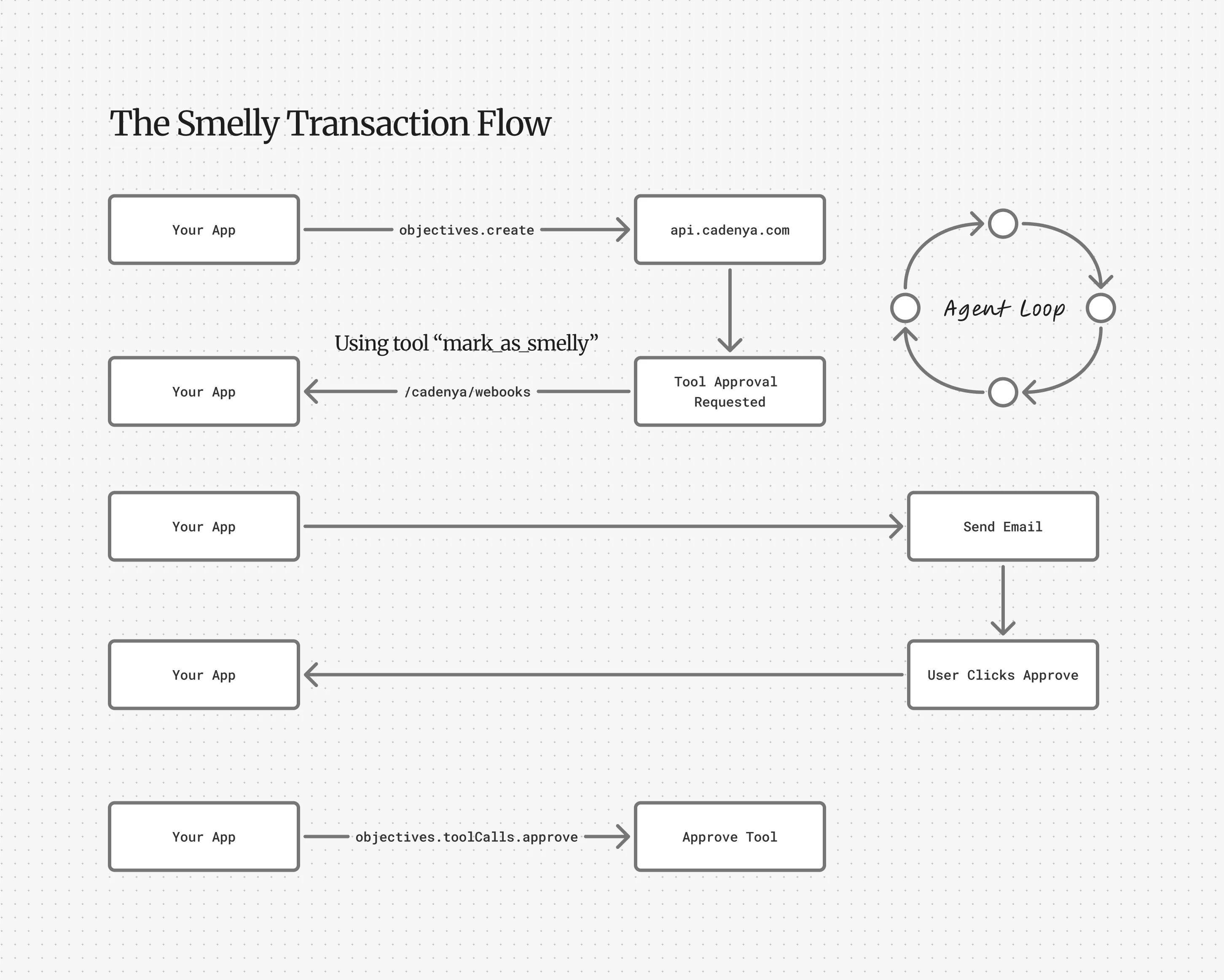
Section titled “Example Workflow”Say you want to let a user know when your AI Agent is requesting permission to use a tool. For example: approving an expense for a user. The flow would look like:
- Cadenya sends your application a webhook
- Your application sends an email to the user with a link to approve or reject
- The customer clicks the “approve” link which is hosted by your app, and consequently sends Cadenya an approve tool call API request.
- Your AI Agent in Cadenya continues
You’d have a small app that looks like this in Ruby:
require 'sinatra'require 'json'require 'openssl'require 'base64'require 'net/http'require 'uri'require 'mail'
CADENYA_SIGNING_KEY = ENV.fetch('CADENYA_WEBHOOK_SECRET')CADENYA_API_KEY     = ENV.fetch('CADENYA_API_KEY')CADENYA_API_BASE    = ENV.fetch('CADENYA_API_BASE', 'https://api.cadenya.com')APP_BASE_URL        = ENV.fetch('APP_BASE_URL', 'http://localhost:4567')LINK_SIGNING_KEY    = ENV.fetch('LINK_SIGNING_KEY')
Mail.defaults { delivery_method :smtp, address: ENV['SMTP_HOST'], port: 587 }
post '/webhooks/cadenya' do  body       = request.body.read  webhook_id = request.env['HTTP_WEBHOOK_ID']  ts         = request.env['HTTP_WEBHOOK_TIMESTAMP']  received   = request.env['HTTP_WEBHOOK_SIGNATURE']
  digest   = OpenSSL::HMAC.digest('sha256', CADENYA_SIGNING_KEY, "#{webhook_id}.#{ts}.#{body}")  expected = "v1,#{Base64.strict_encode64(digest)}"  halt 401 unless Rack::Utils.secure_compare(expected, received)
  event = JSON.parse(body)  return 204 unless event['type'] == 'objective_event.tool_approval_requested'
  data         = event['data']  workspace_id = data['objective']['workspaceId']  objective_id = data['objective']['id']  tool_call_id = data['objectiveEvent']['data']['toolApprovalRequested']['toolCallId']  agent_name   = data['agent']['name']
  token = sign_link(workspace_id, objective_id, tool_call_id)
  Mail.deliver do    to      'user@example.com'    from    'agents@example.com'    subject "#{agent_name} needs your approval"    body    <<~TXT      Approve: #{APP_BASE_URL}/decide/approve?t=#{token}      Deny:    #{APP_BASE_URL}/decide/deny?t=#{token}    TXT  end
  204end
get '/decide/:decision' do  workspace_id, objective_id, tool_call_id = verify_link(params[:t])  action = params[:decision] == 'approve' ? 'approve' : 'deny'
  uri = URI("#{CADENYA_API_BASE}/v1/workspaces/#{workspace_id}/objectives/#{objective_id}/tool_calls/#{tool_call_id}/#{action}")  req = Net::HTTP::Put.new(uri)  req['Authorization'] = "Bearer #{CADENYA_API_KEY}"  req['Content-Type']  = 'application/json'  req.body = '{}'
  Net::HTTP.start(uri.host, uri.port, use_ssl: true) { |h| h.request(req) }  "Tool call #{action}d. The agent will continue."end
def sign_link(*parts)  payload = parts.join('|') + "|#{Time.now.to_i + 86_400}"  sig     = OpenSSL::HMAC.hexdigest('sha256', LINK_SIGNING_KEY, payload)  Base64.urlsafe_encode64("#{payload}|#{sig}", padding: false)end
def verify_link(token)  raw = Base64.urlsafe_decode64(token)  workspace_id, objective_id, tool_call_id, exp, sig = raw.split('|')  payload  = "#{workspace_id}|#{objective_id}|#{tool_call_id}|#{exp}"  expected = OpenSSL::HMAC.hexdigest('sha256', LINK_SIGNING_KEY, payload)  halt 401 unless Rack::Utils.secure_compare(expected, sig) && Time.now.to_i <= exp.to_i  [workspace_id, objective_id, tool_call_id]end
Use Case: Smelly Expenses
Section titled “Use Case: Smelly Expenses”Say you are building the next expense tracking application (because there aren’t enough), and you want an AI Agent to validate and do any smell checks on the receipt automatically. If the receipt is suspicious, the agent might ask for approval before marking it as completed.
Your agent’s system prompt might resemble:
You are an expense report manager that validates expenses match our general company policy. You will be given the details of a receipt, and you must validate them against our corporate policy in the memory
company/expenses/policy.md.If a receipt is “smelly” - (IE: Took a road trip to Las Vegas to meet with a client and took them to a speakeasy) call the
confirm_smelltool to request a second-glance from the employee’s manager.
Tricks
Section titled “Tricks”It is recommended to leverage the externalId and labels fields of any metadata key in Cadenya to track your own state. For example, if the receipt in your own database has an ID of receipt_cy1shs, you can store it in the externalId of your objective on create:
curl https://api.cadenya.com/v1/workspaces/$WORKSPACE_ID/objectives \ -H 'Content-Type: application/json' \ -H "Authorization: Bearer $CADENYA_API_KEY" \ -d '{ "agentId": "agentId", "data": {}, "metadata": { "externalId": "receiptId:receipt_cy1shs" } }'Now, when Cadenya sends you webhooks during the agent’s loop, you’ll always receive that externalId you assigned in the payload:
{ "type": "objective_event.tool_approval_requested", "timestamp": "2026-05-04T17:20:00Z", "data": { "objective": { "id": "obj_01J...", "externalId": "receiptId:receipt_cy1shs" # <-- your ID 🔥 }, "objectiveEvent": { "type": "tool_approval_requested", "data": { "toolApprovalRequested": { "toolCallId": "tc_01J..." } } } }}