Agents
Agents are how you connect behavior to intelligence in Cadenya. Agents are designed with multiple variations, tools, memory, and more. This guide explains the concepts behind them.
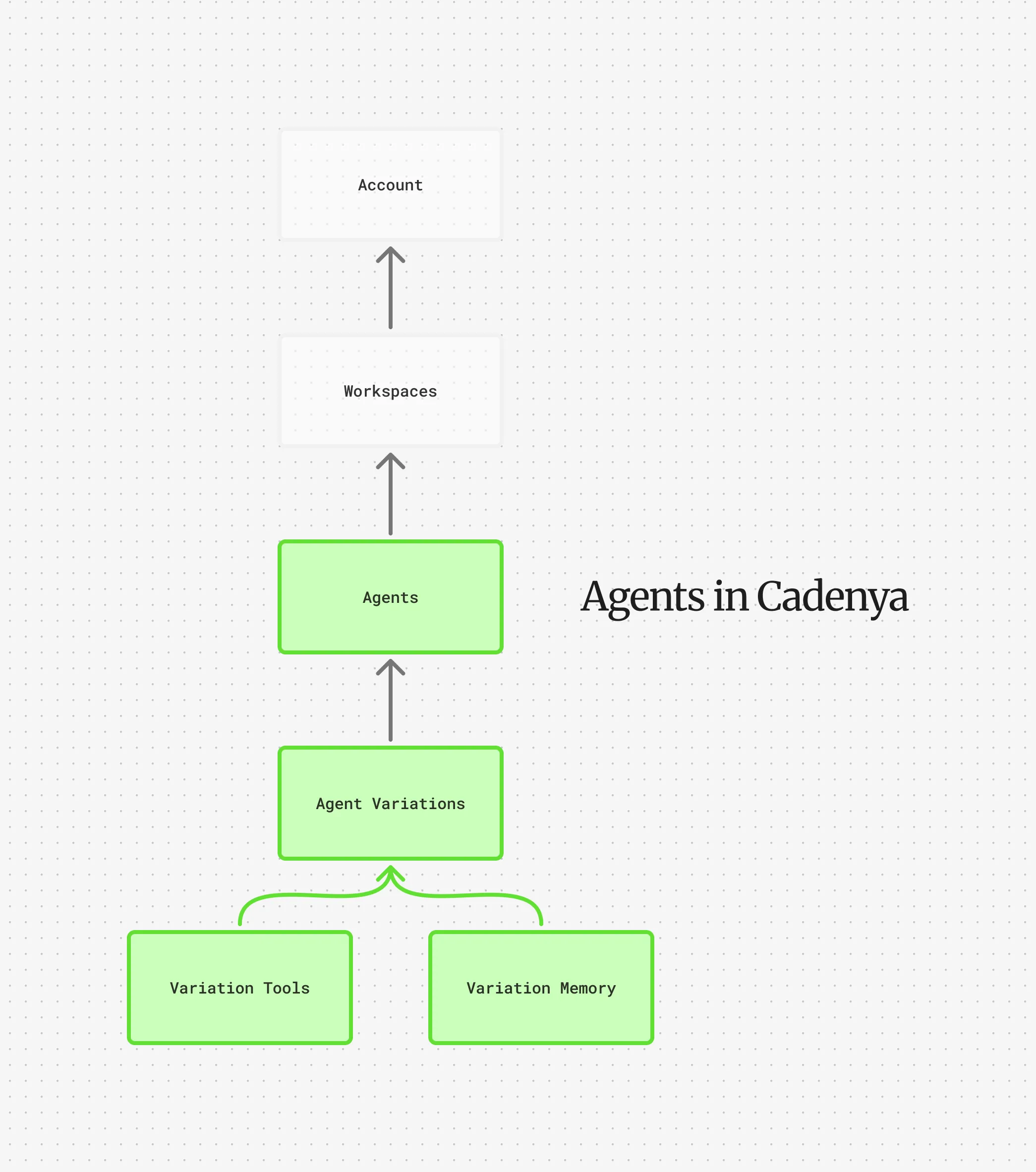
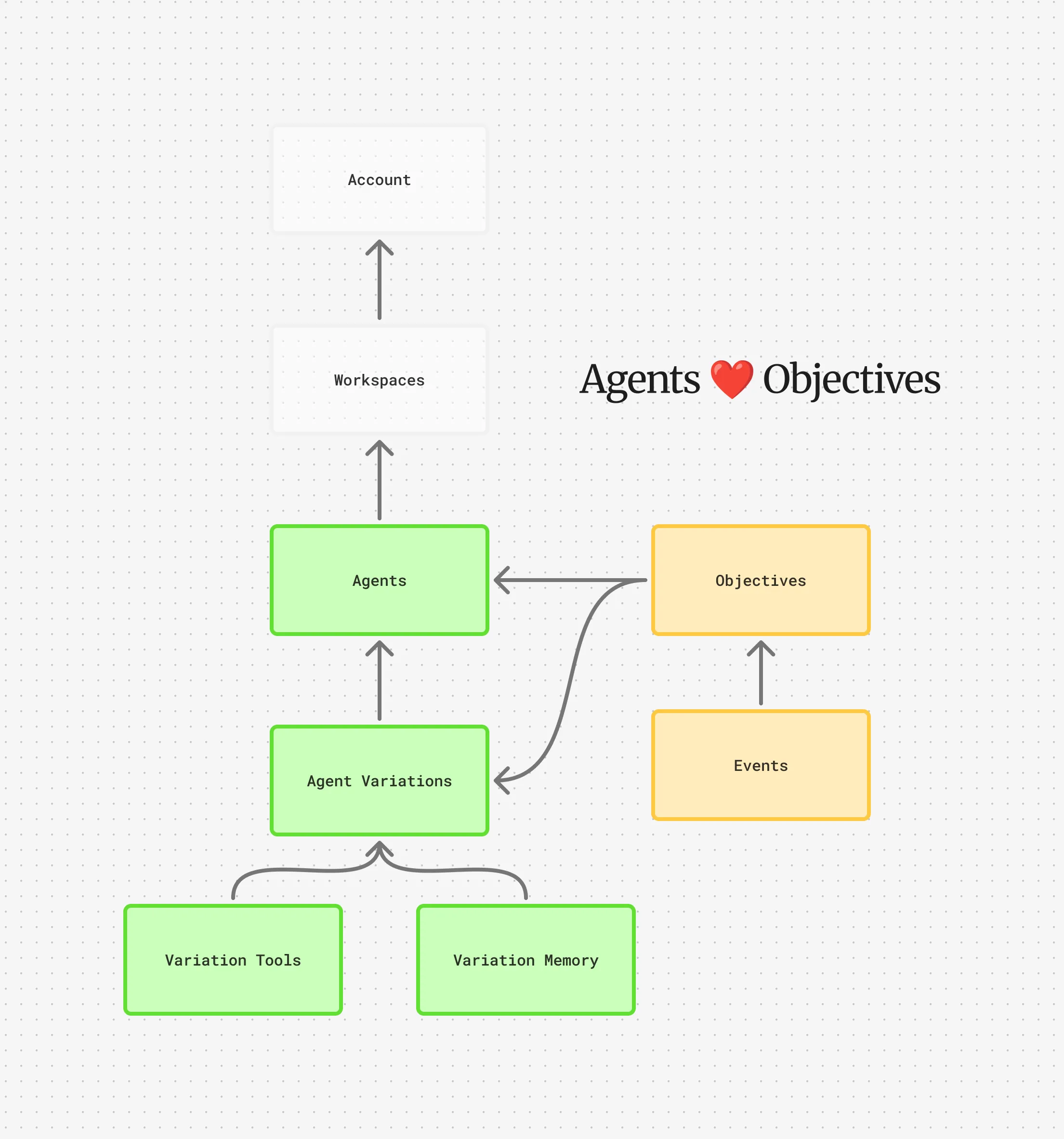
Agents are why you’re here, right? In Cadenya, an agent is broken down by different “Variations” that can be randomly selected, or chosed based on their effectiveness after receiving feedback. They’re designed to be incredibly flexible, and remove the need to change code as new models are released. Additionally, adding new variations can improve speed or accuracy (or, why not both?).
The Basics
Section titled “The Basics”Agent’s are a Workspace Resource type in Cadenya. They have a name, labels, external id, etc. They also have a description, variation selection mode, and optional webhook endpoint. The behavior is configured in an agent’s variations, not on the agent record itself. See below.
Variation Selection Mode
Section titled “Variation Selection Mode”When an objective is created for an agent, there are two different ways we’ll select the correct variation before initiating the objective (assuming a variation is not explicitly specified).
| Type | Description |
|---|---|
| Random | Does what it says on the tin: We’ll randomly select an agent when an objective is created. |
| Weighted | Uses Thompson Sampling to select a variation based on the feedback it has received. |
Webhook Endpoint
Section titled “Webhook Endpoint”Cadenya loves sending you webhooks. It’s one of our favorite things to do, because it’s how we inform you instantly of objective events as an agent performs work. We’ll send you all sorts of things, from new assistant messages, to tool approval requests.
Webhooks must use HTTPS. Webhook payloads follow Standard Webhooks format as well, so you’ll be able to validate their payload and unwrap them based on their type. Our Typescript and Go packages both support unwrapping webhooks.
Agent Variations
Section titled “Agent Variations”Variations are where (most) of the magic happens in agent configuration.
Why variations matter
Section titled “Why variations matter”Variations have their own model, tools, memory, compaction config, etc. Variations also receive their own feedback when objectives complete, too, making it possible to track their effectiveness, usage, and make business decisions on which variation is performing best.
Cadenya’s analytics are designed to reveal how an agent variation is performing, and you’ll be able to make revisions to variations, or add completely new ones to your agent’s pool for new objectives to try.
The flow of an agent variation selection process looks like:
flowchart TD A[POST /v1/objectives] --> B{variation_id provided?} B -->|Yes| F[Use specified variation] B -->|No| C{selection_mode} C -->|RANDOM| D[Pick variation uniformly] C -->|WEIGHTED| E[Pick by weight] D --> F E --> F F --> G[Selected variation]Progressive Discovery
Section titled “Progressive Discovery”By default, all tools assigned to a variation are loaded into the context window when an objective starts. This is fine when you have a handful of tools, but it gets expensive fast. If your variation has 30+ tools, that’s a lot of tokens spent on definitions the agent might never touch.
Progressive discovery changes this. Instead of loading everything upfront, the agent gets a search_tools tool and finds what it needs on demand. Only matched tools are added to context, keeping the window lean.
You can tune this with three knobs:
max_toolslimits how many tools get added per search.hintsgives the agent keywords to steer its searches in the right direction. If your agent keeps searching for the wrong thing, hints help.rerank_thresholdfilters out tools that don’t match well enough by name or description, preventing irrelevant tools from sneaking into context.
Compaction
Section titled “Compaction”Agents working on long-running objectives will eventually fill up their context window. Compaction is how Cadenya handles this so the agent can keep going.
When token usage crosses the trigger_threshold (a percentage of the model’s max input tokens), Cadenya compacts the conversation and opens a fresh context window. The old conversation is condensed and carried forward so the agent doesn’t lose track of what it was doing.
There are two compaction strategies, and they can run together:
- Summarization condenses older turns into a summary. You can provide custom
instructionsto tell the summarizer what to preserve. For example: “Keep customer identifiers, ticket numbers, and any refund decisions.” - Tool result clearing strips the content from older tool results while keeping the function name and arguments intact. The
preserve_recent_resultssetting controls how many recent results stay untouched.
Some models start losing performance well before hitting their token limit. The trigger_threshold lets you compact early. A value of 0.75 means compaction kicks in at 75% capacity, which is a good default for most models.
Defining an Agent Variation
Section titled “Defining an Agent Variation”Agent Variations are configurable in the Cadenya UI, but it’s more likely you’ll configure using our GitHub action via yaml,
agent_id: agent_01J7...metadata: name: support-concise-v2 external_id: your-own-id-in-your-systemspec: description: Concise support variation with episodic recall weight: 50 prompt: | You are a support agent. Verify identity before any change. Keep replies under three sentences unless the user asks for detail. model_config: model_id: model_abc123123 temperature: 0.3 constraints: max_tool_calls: 25 max_sub_objectives: 3 progressive_discovery: max_tools: 1 hints: billing rerank_threshold: 0.8 enable_episodic_memory: true episodic_memory_ttl: seconds: 2592000 compaction_config: trigger_threshold: 0.75 summarization: instructions: | Preserve customer identifiers, ticket numbers, and any decisions about refunds or account changes. tool_result_clearing: preserve_recent_results: 3Field reference
Section titled “Field reference”| Field | Notes |
|---|---|
model_config.model_id | Use the /v1/models endpoint to see all models available (there’s a lot!). |
constraints | Optional. Prevents runaway agents by capping tool calls and sub-objective fan-out. |
progressive_discovery | Prevents tools from clobbering your context window — the agent searches for tools instead of having every assigned tool loaded up-front. |
progressive_discovery.max_tools | Restricts how many tools get added to context on each search (assuming it returns multiple results, which might be the case). |
progressive_discovery.hints | Given to the agent before searching for tools so it has an idea of what keywords to use. If your agent keeps looking for tools incorrectly, it might need some steering. Optional. |
progressive_discovery.rerank_threshold | Prevents irrelevant tools from being added to context if the tool doesn’t match (name, description) by much when the agent searches for it. |
enable_episodic_memory | If enabled, we’ll create a memory layer specific to the agent based on the episodic_key and append a store_memory tool to every agent. |
episodic_memory_ttl | We’ll vacuum unnecessary memories after a certain TTL, just like the scene in Inside Out. But triple mint gum might never leave. https://www.youtube.com/watch?v=bv6oplOzgkQ |
compaction_config | Compaction is key to making sure agents can iterate on long-running tasks. We’ll compact within the threshold of the max token input for the model selected. Some models lose performance after a certain percentage of tokens used — use this at your discretion. |